Skip to Content

Category Archives: Amazon

🪵 Why Amazon Rejects Your Palletized Shipments (and How to Fix It)

By SnappyCrate | Updated August 2025

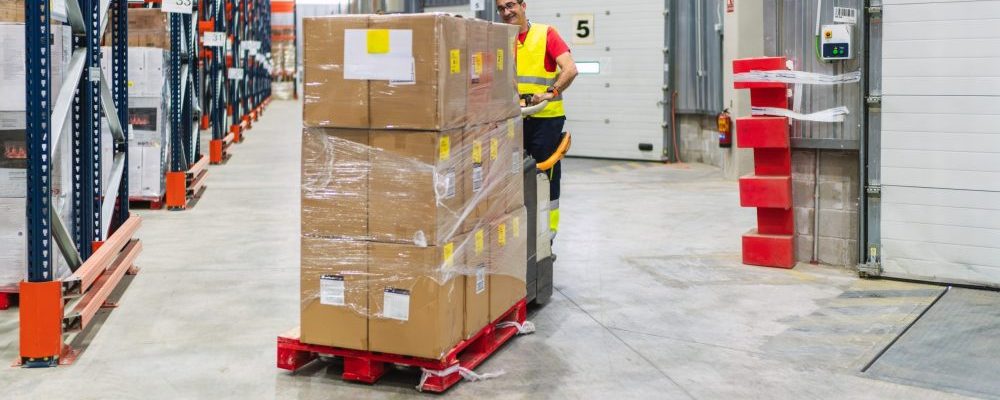
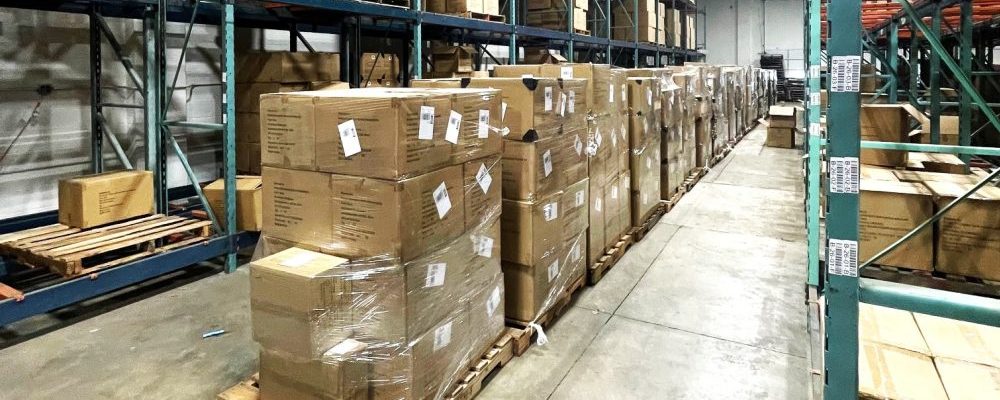
Even experienced Amazon sellers face the dreaded “rejected shipment” notice. Palletized freight shipments to Amazon FBA are frequently turned away for non-compliance with strict inbound rules.

At SnappyCrate, we see the same mistakes repeated—and we fix them before they cost sellers money. Here’s why Amazon rejects palletized shipments and how to prevent it.


🚫 Top Reasons Amazon Rejects Palletized Shipments

1️⃣ Oversized or Non-Standard Pallets

  • Amazon requires standard 40” x 48” wooden GMA pallets.
  • Pallets larger than standard size or made of plastic/metal are refused.

Solution: Always use GMA 4-way entry wood pallets in good condition.


2️⃣ Exceeding Pallet Height or Weight Limits

  • Max pallet height: 72 inches (including pallet).
  • Max pallet weight: 1,500 lbs.

Solution: Re-stack or split pallets to stay within limits.


3️⃣ Poor Shrink Wrapping and Stability

  • Unsecured or leaning pallets are flagged as unsafe.
  • Torn or loose shrink wrap leads to rejections.

Solution: Use heavy-duty shrink wrap, corner boards, and proper stacking techniques.


4️⃣ Missing or Incorrect Pallet Labels

  • Each pallet must have four identical pallet labels (one on each side).
  • Labels must match shipment IDs and be clearly visible.

Solution: Print fresh labels and place on the outside of shrink wrap.


5️⃣ Mixed SKU Pallets Without Separation

  • Mixing SKUs without clear carton separation causes confusion during check-in.

Solution: Segregate SKUs or clearly mark sections of mixed pallets.


6️⃣ Missed Delivery Appointments

  • Carriers that fail to schedule or miss dock appointments will be turned away.

Solution: Always book through Carrier Central or use Amazon-partnered carriers.


🔧 How SnappyCrate Prevents Rejections

  • Amazon-compliant pallet building (40×48, max height/weight).
  • Secure shrink wrapping with corner protection.
  • Correct pallet labeling on all sides.
  • Freight appointment scheduling via Carrier Central.
  • Pre-shipment quality checks to ensure compliance.

💡 Real Example: Fixing a Rejected Shipment

A seller came to us after their LTL load was refused due to oversized pallets and missing labels. SnappyCrate re-palletized their inventory, applied correct labeling, and rescheduled freight. The shipment was successfully received within 72 hours.


✅ Final Thoughts

Rejected palletized shipments cost you time, money, and sales momentum. With SnappyCrate, every pallet is prepped, wrapped, labeled, and scheduled to Amazon’s exact standards—no surprises at the dock.

📞 Want guaranteed FBA-compliant pallet shipments? Send us a message

Contact Form


Request Pricing for FBA Prep & Omnichannel Fulfillment

 
SnappyCrate is Amazon FBA prep, DTC, and B2B fulfillment—all under one roof


Talk to a fulfillment expert today

0 Continue Reading →

📦 Case Packed vs. Individual Units: Which One is Best for FBA Shipments?

By SnappyCrate | Updated August 2025

When creating an Amazon FBA shipment, you’ll be asked to choose between Case Packed and Individual Units. This decision affects how your inventory is prepped, labeled, and received by Amazon fulfillment centers.

At SnappyCrate, we help sellers understand these options and choose the best one for their business. Here’s what you need to know.


🏷️ What is a Case Packed Shipment?

A Case Packed shipment means:

  • All units in a single carton are identical (same SKU).
  • Each case contains the same quantity of units.
  • Cases must be fully sealed and labeled.

✅ Benefits of Case Packed:

  • Faster check-in at FBA (easier for Amazon to receive).
  • Less labeling required if units are pre-labeled by manufacturer.
  • Lower risk of mix-ups or errors.

❌ Limitations:

  • Not suitable for mixed SKU shipments.
  • Requires manufacturers or suppliers to package units consistently.

🛒 What is an Individual Units Shipment?

An Individual Units shipment means:

  • A carton contains different SKUs or varying quantities.
  • Each unit must be individually prepped and labeled.

✅ Benefits of Individual Units:

  • Flexible for mixed shipments.
  • Great for smaller sellers or limited inventory runs.

❌ Limitations:

  • Slower check-in at FBA.
  • Requires meticulous prep and labeling for every single unit.
  • Increased chance of errors if box content isn’t uploaded correctly.

🔑 How Amazon Handles Each Type

  • Case Packed: Amazon scans one unit from each carton and quickly receives the full case.
  • Individual Units: Amazon must scan and receive each unit separately, increasing processing time.

💡 How to Decide Which is Best

  • Use Case Packed if:
    • You have bulk quantities of a single SKU.
    • Your manufacturer/supplier already preps and seals cartons.
  • Use Individual Units if:
    • You are shipping small quantities of multiple SKUs.
    • You need flexibility to combine products in a single shipment.

Many sellers use both methods—Case Packed for high-volume SKUs, Individual for variety shipments.


🚚 How SnappyCrate Simplifies the Process

  • Organize and prep inventory for either shipment type.
  • Generate accurate box content files to avoid Amazon fees.
  • Provide FNSKU labeling and secure packaging.
  • Ensure cartons meet Amazon’s weight and size limits.

✅ Final Thoughts

Choosing between Case Packed vs. Individual Units depends on your inventory mix and supplier setup. With SnappyCrate, you get expert help prepping and shipping both types—so your products arrive FBA-ready and error-free.

📞 Need help deciding the best FBA shipment type? 

Contact Form


Request Pricing for FBA Prep & Omnichannel Fulfillment

 
SnappyCrate is Amazon FBA prep, DTC, and B2B fulfillment—all under one roof


Talk to a fulfillment expert today

0 Continue Reading →

🏷️ How to Prepare and Label Your Products for FBA Like a Pro

By SnappyCrate | Updated August 2025

Proper prep and labeling are non-negotiable when shipping to Amazon FBA. Mistakes can result in delays, added fees, or even rejected shipments. At SnappyCrate, we specialize in FBA-compliant prep to keep your products moving smoothly into Amazon fulfillment centers.

Here’s your step-by-step guide to preparing and labeling products like a pro.


🔑 1. Understand Amazon’s Prep Requirements

Amazon requires every unit to be securely prepped to prevent damage and ensure scannability. Common prep types include:

  • Poly bagging: For loose items, fabric goods, or items that could leak.
  • Bubble wrapping: For fragile or breakable items.
  • Taping: Seal all openings on retail boxes.
  • Kitting/Bundling: Multi-item packs must be labeled as “Sold as Set.”

SnappyCrate handles all prep types, ensuring compliance every time.


🖨️ 2. Print and Apply FNSKU Labels Correctly

Each unit must be labeled with an Amazon FNSKU barcode:

  • Labels must be scannable and placed on a flat, visible surface.
  • Cover all manufacturer UPCs to avoid scanning errors.
  • Use white, non-reflective labels (1″ x 2″ standard size).

💡 Pro Tip: Print labels directly from Seller Central or let SnappyCrate handle printing and application for you.


📦 3. Follow Box Content and Carton Labeling Rules

Every shipment must include box-level details:

  • Provide box content information in Seller Central or use 2D barcodes.
  • Each carton must have Amazon shipment ID labels on two adjacent sides.
  • Avoid damaged or reused boxes that compromise label visibility.

✅ We apply both unit and carton labels in-house, using Amazon-approved printers.


🪵 4. Prep for Specialty Products

Certain products need extra care:

  • Liquids: Double-sealed and bagged to prevent leaks.
  • Sharp items: Must be sheathed or bubble-wrapped.
  • Apparel/fabric: Poly bags with suffocation warnings.
  • Hazmat (dangerous goods): Special paperwork and labeling required.

✅ SnappyCrate is trained in Hazmat compliance and advanced prep.


🚫 Common Prep and Labeling Mistakes to Avoid

  • Using UPC instead of FNSKU labels.
  • Forgetting to cover manufacturer barcodes.
  • Sending unbagged fabric items or unsealed boxes.
  • Mislabeled SKUs causing inventory mix-ups.
  • Illegible or faded labels rejected at check-in.

🔧 How SnappyCrate Simplifies Prep & Labeling

  • Print and apply Amazon-compliant FNSKU labels.
  • Handle all prep work (poly bags, bubble wrap, bundling).
  • Generate box content files and 2D barcodes.
  • Provide photo documentation for quality assurance.
  • Offer 24–48 hour turnaround for fast replenishment.

✅ Final Thoughts

Prep and labeling mistakes cost sellers time, money, and Buy Box position. With SnappyCrate, your inventory arrives at FBA ready to receive—without delays or extra fees.

📞 Ready to hand off your prep and labeling to the experts? Contact SnappyCrate today for worry-free FBA compliance.

0 Continue Reading →

📦 Restock Limits, Capacity Manager & FBA Forecasting: What’s New in 2025

By SnappyCrate | Updated August 2025

In 2025, Amazon sellers face new challenges around restock limits, capacity management, and inventory forecasting. Mismanaging these changes can lead to stockouts, excess fees, or stranded inventory.

At SnappyCrate, we help sellers navigate these evolving policies with smart inventory planning and efficient 3PL services. Here’s what’s new in 2025—and how to stay ahead.


🔑 1. Restock Limits Are Now Dynamic

Amazon’s restock limits now adjust weekly, based on:

  • Your historical sales velocity
  • Inventory age and sell-through rates
  • Capacity Manager bids (more on this below)

✅ What This Means for Sellers:

  • You must track inventory performance constantly.
  • Over-ordering can tie up capital and eat up your restock capacity.
  • Understocking risks stockouts and lower Buy Box wins.

Snappy Tip: We monitor sell-through and help clients stage inventory at our 3PL for faster replenishment.


📊 2. Capacity Manager Is Here to Stay

Amazon’s Capacity Manager allows sellers to request additional storage capacity by bidding on extra space.

How It Works:

  • Submit bids based on how much extra capacity you need.
  • The higher your bid, the better your chances of approval.
  • Fees apply if you don’t use the full space granted.

Snappy Tip: By holding buffer stock at SnappyCrate, you can bid strategically and only ship in what you need.


📅 3. FBA Forecasting Is Critical

With dynamic restock limits, accurate forecasting matters more than ever.

Key Forecasting Best Practices:

  • Analyze seasonal trends and promotions early.
  • Use rolling 90-day forecasts tied to Amazon’s inventory reports.
  • Maintain backup stock at your 3PL for quick replenishment.

SnappyCrate clients benefit from real-time reporting to plan inventory flow efficiently.


🚨 4. Aging Inventory Penalties Are Tougher

Amazon has increased Aged Inventory Surcharge Fees for stock sitting over 181 days.

✅ How to Avoid This:

  • Ship smaller, frequent replenishments from your 3PL.
  • Remove slow-moving SKUs before they accrue charges.
  • Use SnappyCrate’s removal order receiving and resale prep.

💡 5. How SnappyCrate Helps You Stay Ahead

  • Staging inventory at our warehouse to stay within restock limits.
  • Fast prep & ship to replenish FBA within 24–48 hours.
  • Inventory tracking to monitor sell-through and prevent overstock.
  • Removal order handling to quickly re-label and reship slow sellers.

✅ Final Thoughts

Amazon’s inventory policies are evolving fast—but with the right 3PL partner, you can stay agile. SnappyCrate helps sellers balance storage, forecasting, and compliance so they keep products in stock without racking up extra fees.

📞 Ready to master FBA restock limits and capacity management? Send us a message

Contact Form


Request Pricing for FBA Prep & Omnichannel Fulfillment

 
SnappyCrate is Amazon FBA prep, DTC, and B2B fulfillment—all under one roof


Talk to a fulfillment expert today

0 Continue Reading →

💰 Amazon Increasing Non-Compliant Fees: How to Stay Ahead with a Pro 3PL Partner

By SnappyCrate | Updated August 2025

Amazon has been tightening its grip on inbound shipment compliance—and in 2025, fees for non-compliant shipments are higher than ever. If your products don’t meet FBA prep, labeling, or pallet requirements, Amazon will charge penalties, delay check-ins, or even reject inventory entirely.

At SnappyCrate, we ensure our clients stay fully compliant and avoid these costly mistakes. Here’s what you need to know about the latest non-compliance fees and how a specialized 3PL can protect your bottom line.


📈 What Are Amazon’s Non-Compliance Fees?

Amazon charges fees when inbound shipments don’t meet FBA requirements. Common charges include:

  • Labeling fees (if Amazon must re-label units)
  • Prep service fees (if Amazon bags, bubbles, or repacks products)
  • Overweight/oversized box fees
  • Pallet rework fees for non-standard pallets or stacking
  • Manual processing fees for missing box content information

In 2025, these fees have increased by 10–20% across multiple categories.


🚨 Recent Policy Updates in 2025

  • Stricter box weight enforcement: Amazon now flags boxes over 50 lbs faster.
  • Expanded capacity limit penalties: Over-shipping beyond restock limits may incur additional fees.
  • Higher rework charges for rejected pallets and mislabeled SKUs.
  • New mandatory 2D barcodes for box content on larger shipments.

⚠️ Why Non-Compliance Hurts More Than Just Your Wallet

Beyond fees, non-compliant shipments lead to:

  • Delayed check-ins (weeks of lost sales)
  • Stranded inventory or returns
  • Lower account health scores, risking FBA privileges
  • Increased negative feedback from stockouts

✅ How SnappyCrate Helps You Avoid Fees

As an Amazon-focused 3PL, we handle compliance from start to finish:

  • FNSKU labeling (covering manufacturer barcodes)
  • Poly bagging, bubble wrapping, and bundling to FBA standards
  • Box weight checks and compliant repackaging
  • Amazon-ready pallet building with shrink wrap and labels
  • 2D barcode box content uploads to prevent manual processing fees

💡 Real-World Example

One of our clients sent bulk shipments directly to FBA and incurred $3,200 in labeling and pallet rework fees in a single quarter. After switching to SnappyCrate, their compliance issues dropped to zero, and check-ins sped up by 40%.


🔑 Stay Ahead with a Pro 3PL

The cost of compliance errors is only rising. Partnering with a dedicated FBA 3PL like SnappyCrate pays for itself by:

  • Reducing delays and avoiding penalties
  • Streamlining prep, labeling, and freight
  • Monitoring Amazon policy updates in real-time

🚀 Final Thoughts

Amazon won’t slow down on compliance enforcement—so why risk it? Let SnappyCrate handle your prep, labeling, palletizing, and shipping so you stay ahead of costly mistakes.

📞 Ready to eliminate FBA non-compliance fees? Send us a message

Contact Form


Request Pricing for FBA Prep & Omnichannel Fulfillment

 
SnappyCrate is Amazon FBA prep, DTC, and B2B fulfillment—all under one roof


Talk to a fulfillment expert today

0 Continue Reading →

🚚 LTL vs. SPD for Amazon FBA: Which One is Right for You?

By SnappyCrate | Updated August 2025

When sending inventory to Amazon FBA, you must choose between Small Parcel Delivery (SPD) or Less-Than-Truckload (LTL) freight. The right choice impacts your costs, speed, and compliance. At SnappyCrate, we help sellers make the best shipping decision every time. Here’s how to decide between SPD and LTL for your FBA shipments.


📦 What is SPD (Small Parcel Delivery)?

SPD means shipping individual boxes via parcel carriers (like UPS, FedEx, or Amazon-partnered carriers).

✅ Pros:

  • Great for small shipments (less than 150 lbs total)
  • Simple to set up in Seller Central
  • No palletizing required
  • Faster check-in for smaller loads

❌ Cons:

  • Higher per-box shipping costs
  • Less control over multiple-box tracking
  • Prone to delays if many boxes are shipped separately

🪵 What is LTL (Less-Than-Truckload)?

LTL combines multiple pallets on a single freight truck, ideal for bulk shipments.

✅ Pros:

  • Lower cost per unit for large shipments
  • Safer handling (palletized freight is less likely to be damaged)
  • Fewer labels and less box handling
  • Streamlined check-in at Amazon

❌ Cons:

  • Requires palletizing per Amazon standards
  • Appointment scheduling via Carrier Central can delay delivery
  • Not ideal for urgent or small shipments

🔑 When to Use SPD vs. LTL

  • Use SPD if: Your shipment is under 150 lbs, has fewer than 15 boxes, or needs fast delivery.
  • Use LTL if: You’re shipping bulk quantities, palletized inventory, or heavy/oversized goods.

💡 Pro Tip: Hybrid approaches can work—send some units via SPD for immediate stock and the rest via LTL to save costs.


📋 Amazon Requirements for Each

  • SPD: Boxes under 50 lbs each (30 lbs for select products), properly labeled.
  • LTL: Standard 40×48 pallets, max 72” height, pallet labels on all four sides.

SnappyCrate ensures compliance for both methods.


🚀 How SnappyCrate Helps

Whether you choose SPD or LTL, SnappyCrate manages it all:

  • Amazon-compliant labeling and prep
  • Carrier booking and BOL documentation
  • Pallet building and secure wrapping for LTL
  • Fast turnaround for SPD shipments

✅ Final Thoughts

Choosing between SPD and LTL comes down to volume, timing, and cost efficiency. The wrong choice can waste money—or worse, delay your inventory. Let SnappyCrate’s FBA logistics experts help you pick the best option and execute flawlessly.

📞 Ready to streamline your Amazon FBA shipments? Send us a message

Contact Form


Request Pricing for FBA Prep & Omnichannel Fulfillment

 
SnappyCrate is Amazon FBA prep, DTC, and B2B fulfillment—all under one roof


Talk to a fulfillment expert today

0 Continue Reading →

🪵 Palletizing Rules for FBA: How to Prep Freight for Amazon Fulfillment Centers

🪵 Palletizing Rules for FBA: How to Prep Freight for Amazon Fulfillment Centers

By SnappyCrate | Updated July 2025

When shipping inventory to Amazon FBA via LTL or FTL freight, proper palletizing is crucial. Amazon has strict requirements for pallet dimensions, stacking, and labeling. Failure to comply can result in shipment rejections, delays, and costly rework fees.

At SnappyCrate, we specialize in building Amazon-compliant pallets every day. Here’s your definitive guide to palletizing for FBA shipments in 2025.


📏 1. Pallet Size and Type

Amazon only accepts standard GMA 4-way pallets:

  • Dimensions: 40” x 48”
  • Material: Wood, in good condition (no broken boards, nails, or damage)
  • 4-way entry for forklifts

Avoid non-standard pallets, CHEP pallets, or plastic pallets unless otherwise approved.


📦 2. Pallet Height and Weight

Amazon enforces strict limits:

  • Max pallet height: 72” (including the pallet)
  • Max pallet weight: 1,500 lbs
  • Stack boxes evenly without overhang

Do not double-stack unless explicitly approved by Amazon.


🏷️ 3. Labeling Requirements

Each pallet must have 4 identical labels:

  • One on each side of the pallet
  • Labels must be scannable and placed on the outside shrink wrap
  • Include Shipment ID and carrier details

At SnappyCrate, we print and attach all pallet labels securely after wrapping.


🔒 4. Secure Wrapping

Amazon requires pallets to be securely wrapped to prevent shifting:

  • Use clear shrink wrap (avoid opaque wrap)
  • Wrap tightly around all layers
  • Consider using corner boards for added stability
  • Ensure labels remain visible

We use heavy-duty stretch wrap and corner protection for freight security.


🚚 5. Carrier and Appointment Scheduling

For LTL and FTL shipments:

  • Carriers must book dock appointments via Amazon Carrier Central
  • Appointments must be made in advance to avoid delays
  • Amazon-partnered carriers are preferred for faster scheduling

SnappyCrate handles all BOL paperwork and delivery appointments for you.


⚠️ 6. Common Palletizing Mistakes to Avoid

  • Overhanging boxes that extend past pallet edges
  • Mixing SKUs on the same pallet without clear separation
  • Damaged pallets that fail inspection
  • Insufficient wrapping that risks collapse during transit

Our trained team inspects every pallet before it leaves our warehouse.


💡 Why Work With a 3PL for Palletizing?

Palletizing for Amazon FBA can be time-consuming and high-stakes. With SnappyCrate:

  • Amazon-compliant pallet building
  • Freight coordination (LTL/FTL)
  • Secure shrink wrapping and corner protection
  • Real-time tracking and fast turnaround

✅ Final Thoughts

Amazon takes pallet compliance seriously. Don’t risk rejected shipments, extra fees, or delayed check-ins. Let SnappyCrate handle your pallet prep and freight logistics, so your inventory arrives on time and in perfect condition.

📞 Ready to simplify your FBA freight shipments? Send us a message

Contact Form


Request Pricing for FBA Prep & Omnichannel Fulfillment

 
SnappyCrate is Amazon FBA prep, DTC, and B2B fulfillment—all under one roof


Talk to a fulfillment expert today

0 Continue Reading →

🚫 Top 10 Common FBA Inbound Shipment Mistakes (and How to Avoid Them)

By SnappyCrate | Updated July 2025

Amazon FBA is a powerful way to scale your e-commerce business—but only if you get your inbound shipments right. Even small mistakes can lead to costly delays, rejected shipments, and penalties. At SnappyCrate, we specialize in prepping and shipping inventory to FBA the correct way, every time. Here are the 10 most common mistakes sellers make—and how to avoid them.


1. Incorrect or Missing Product Labels

Amazon requires every unit to be labeled with a scannable FNSKU barcode. Common errors include using UPCs instead, poor placement, or blurry printing.

✅ How to Avoid: Always use Amazon-generated FNSKU labels and cover any manufacturer barcodes. SnappyCrate prints and applies compliant labels for you.


2. Failing to Provide Box Content Information

Not submitting box content information in Seller Central can lead to manual receiving fees or delayed check-ins.

✅ How to Avoid: Upload box content info or use 2D barcode labels on cartons. We handle this automatically for all shipments we prep.


3. Overweight or Oversized Boxes

Boxes over Amazon’s 50 lb limit (or 30 lbs for certain products) can be rejected or split apart.

✅ How to Avoid: Distribute inventory properly and use compliant cartons. SnappyCrate weighs and inspects every box before labeling.


4. Non-Compliant Palletizing

Improperly stacked or oversized pallets are a major cause of Amazon rejections.

✅ How to Avoid: Stick to 40×48 standard pallets, max 72” height, with secure shrink wrap. We build Amazon-compliant pallets in-house.


5. Using Unsupported Carriers

Amazon requires approved carriers for LTL and SPD shipments. Unapproved carriers can’t book delivery appointments.

✅ How to Avoid: Use Amazon-partnered carriers or let SnappyCrate handle freight booking and appointments.


6. Poor Packaging and Prep

Unprotected products can arrive damaged and get flagged.

✅ How to Avoid: Use bubble wrap, poly bags with suffocation warnings, and sturdy cartons. SnappyCrate offers full prep services to ensure compliance.


7. Ignoring Hazmat (Dangerous Goods) Requirements

Products flagged as Hazmat require special labeling, paperwork, and approval.

✅ How to Avoid: Verify Hazmat status in Seller Central early. We guide clients through Hazmat prep and approvals.


8. Missing or Damaged Box Labels

Each box needs a correct Amazon shipment ID label. Missing or unreadable labels delay check-in.

✅ How to Avoid: Print fresh labels and attach them to flat, visible surfaces. We apply labels securely after final QC.


9. Late Appointment Scheduling (LTL)

Amazon FCs have limited dock availability. Missed appointments = refusals.

✅ How to Avoid: Book early or let SnappyCrate handle Carrier Central scheduling.


10. Overlooking Amazon’s Latest Policy Updates

Amazon frequently updates inbound requirements, such as new capacity limits and non-compliance fees.

✅ How to Avoid: Partner with a 3PL like SnappyCrate that monitors Amazon policy changes daily.


👉 Final Thoughts

Inbound shipment mistakes cost time, money, and ranking. The easiest way to avoid them? Work with an Amazon-specialized 3PL. At SnappyCrate, we handle inspection, labeling, prep, palletizing, and shipping—so your inventory gets into FBA faster and without errors.

Ready to ship smarter? Send us a message

Contact Form


Request Pricing for FBA Prep & Omnichannel Fulfillment

 
SnappyCrate is Amazon FBA prep, DTC, and B2B fulfillment—all under one roof


Talk to a fulfillment expert today

1 Continue Reading →

🏷️ The Ultimate 2025 Guide to Amazon FBA Inbound Shipment Requirements

By SnappyCrate | Updated July 2025

If you’re an Amazon seller, you already know: sending inventory into FBA isn’t just about slapping on a label and hoping for the best. In 2025, Amazon’s FBA inbound requirements are stricter than ever—with more fees, higher standards, and less tolerance for mistakes. At SnappyCrate, we’ve prepped thousands of FBA shipments and know exactly what it takes to avoid delays, rejections, and added costs.

In this guide, we break down exactly what you need to know about FBA inbound requirements this year—and how a 3PL like us can take this off your plate.


🔄 1. Shipment Creation Starts in Seller Central

Every inbound FBA shipment must begin with a shipment plan created in your Amazon Seller Central dashboard.

You’ll need to:

  • Select Case-Packed or Individual products

  • Upload SKUs with accurate quantities

  • Specify box content (or use 2D barcodes)

  • Choose SPD (Small Parcel Delivery) or LTL/Freight

💡 Snappy Tip: We can create shipment plans for you, or work with plans you’ve created. If you’re unsure how to allocate units, we’ll guide you to avoid split shipments.


📦 2. Packaging Requirements

FBA has very strict packaging rules. Failing to follow them can result in non-compliance fees or rejected shipments.

  • Each unit must be individually packaged and protected

  • Use poly bags with suffocation warnings for loose items

  • Items must be sealed and not easily opened

  • No pricing or third-party stickers

💡 Snappy Tip: We provide full prep services including poly bagging, bubble wrapping, kitting, and bundling—Amazon-compliant, every time.


🔖 3. Labeling Requirements

You must label every unit with an FNSKU barcode (not UPC, unless enrolled in the Amazon stickerless program).

  • Labels must be scannable and placed on a flat, visible surface

  • Cover manufacturer barcodes to avoid confusion

  • Box labels must include shipment ID and carrier information

💡 We print and apply both unit-level and carton labels—including 2D box content barcodes—to save you time.


🪵 4. Pallet and Carton Guidelines (For LTL/Freight)

If you’re shipping pallets into Amazon, you must follow strict LTL rules.

Pallet Guidelines:

  • Standard 40″ x 48″ wooden pallet

  • Max height: 72 inches including pallet

  • Max weight: 1500 lbs per pallet

  • Stack evenly and shrink wrap securely

Carton Guidelines:

  • Max 25″ on any side

  • Max 50 lbs per box (or 30 lbs for certain products)

  • Use heavy-duty, double-wall boxes if needed

💡 Our team builds Amazon-compliant pallets with secure shrink-wrapping, corner guards, and proper labeling.


📅 5. Appointment Scheduling

For LTL/Freight shipments, you or your carrier must schedule a delivery appointment through Amazon’s Carrier Central.

  • Amazon often has limited dock appointments

  • Missed appointments may result in refusals or delays

  • Late arrivals = fees and rescheduling

💡 We handle this whole process for you—from BOL to final check-in—so you don’t lose valuable selling time.


🚫 6. Top Mistakes to Avoid

Many sellers don’t realize how strict Amazon can be until their shipment is delayed or returned. Common mistakes include:

  • Missing or poorly placed labels

  • Overweight boxes

  • Mixed SKUs without box content

  • Incorrect pallet height or configuration

  • Using carriers Amazon doesn’t support

💡 With SnappyCrate, you never have to worry about these details. Our team checks every shipment for full compliance.


✅ Why Choose SnappyCrate for Your FBA Shipments?

We’re not just a warehouse—we’re a partner in your Amazon success.

  • Amazon-specialized 3PL

  • Real-time visibility and fast turnarounds

  • Inspection, prep, labeling, bundling, and palletization

  • Cost-effective freight solutions

  • Expert support to troubleshoot Seller Central issues


📞 Ready to Ship Smarter?

Let SnappyCrate take the stress out of your FBA inbound shipments.
📍 Based in [Your Location] | 🕒 24–48 hour turnaround

Contact Form


Request Pricing for FBA Prep & Omnichannel Fulfillment

 
SnappyCrate is Amazon FBA prep, DTC, and B2B fulfillment—all under one roof


Talk to a fulfillment expert today

0 Continue Reading →