Skip to Content

Blog Archives

Real Time Inventory Management Software for E-commerce Success

Ever tried watching a live game on a choppy, delayed video feed? You see the big play moments after it actually happened. That’s exactly what it feels like to run an e-commerce business on outdated spreadsheets.

Real-time inventory management software is your 4K live broadcast. It gives you a continuously updated, crystal-clear view of your stock levels across every warehouse and sales channel, all at once.

What Is Real-Time Inventory Management?

A person in a warehouse scans a cardboard box with a barcode scanner, with 'LIVE INVENTORY' text.

At its core, real-time inventory management means your stock levels are tracked and updated the instant something happens. An item gets sold, received, moved, or returned, and your records reflect that change immediately across every system.

This isn’t about batch-updating a spreadsheet at the end of the day. It’s a living, breathing system that mirrors physical reality in the digital world. Think of it as the central nervous system for your inventory, connecting your sales channels, warehouse operations, and purchasing department in perfect sync.

The Tech Behind the Live Feed

This instant synchronization isn't magic—it's a carefully orchestrated process powered by a few key pieces of technology working together.

Here’s what makes it all possible:

  • Barcode Scanners and RFID: Your warehouse team uses handheld devices to scan items at every touchpoint—receiving, putaway, picking, and shipping. This zaps the data straight to the central system, killing manual entry errors for good.
  • API Integrations: Your software creates a digital handshake with e-commerce platforms like Shopify and marketplaces like Amazon. When a sale happens online, the API immediately tells your inventory system to deduct that unit from the total count.
  • Warehouse Management System (WMS): This is the operational brain. It crunches all the incoming data from scanners and APIs, updates the master inventory count, and syncs that new, accurate number back out to all your sales channels.

This constant, two-way flow of information ensures the stock level displayed on your website is a true reflection of what’s actually on your warehouse shelves.

A business that relies on periodic or manual inventory updates is essentially flying blind. Real-time visibility turns guesswork into certainty, preventing the costly mistakes that can damage customer trust and profitability.

Why Real-Time Data Is a Necessity, Not a Luxury

In the 24/7 world of e-commerce, delayed data is a recipe for disaster—think overselling, stockouts, and unhappy customers. Real-time visibility has quickly become a foundational requirement for modern retailers and 3PLs.

It’s no surprise the global inventory management software market is projected to hit USD 5.16 billion by 2031. This massive growth is fueled by the intense demand for live stock visibility in e-commerce. You can dig deeper into this explosive market growth with reports from industry analysts.

For a clearer picture of how this shift impacts day-to-day operations, let's compare the old way with the new.

Manual vs Real-Time Inventory Management

The difference between manual or batch systems and a real-time solution is night and day. One leaves you reacting to old news, while the other puts you in proactive control.

Aspect Manual / Batch System Real-Time System
Data Accuracy Low. Prone to human error and always outdated. High. Continuously updated with every transaction.
Visibility Fragmented. You only get a snapshot during counts. Unified. A single, live view across all channels.
Overselling Risk High. Stock levels aren't synced with sales velocity. Low. Inventory is deducted the moment a sale is made.
Decision Making Reactive. Based on historical, often inaccurate data. Proactive. Based on live, accurate inventory levels.
Operational Speed Slow. Requires manual updates and physical checks. Fast. Automated processes reduce labor and delays.
Customer Experience Poor. Leads to stockouts and canceled orders. Excellent. Accurate stock info prevents disappointment.

Upgrading to a real-time system is more than just a software change; it’s a fundamental shift in how you run your business. It allows you to make smarter purchasing decisions, fulfill orders faster, and build a brand that customers trust to deliver.

Core Features That Power E-commerce Operations

A laptop and smartphone displaying synchronized data dashboards, with an orange banner reading 'Multi-Channel Sync'.

A powerful real time inventory management software is the command center for your entire e-commerce operation. It’s not just about counting units; it's about putting critical tasks on autopilot to prevent errors, save time, and clear the path for growth.

Once you understand its core features, you'll see how it turns operational chaos into a smooth, efficient machine. Each one solves a high-stakes problem every online seller knows all too well.

Multi-Channel Synchronization

Think of your inventory as one big pool of water. Every sales channel you have—Shopify, Amazon, Walmart—is a tap drawing from that same pool. Without a way to measure the water level instantly, you have no idea how much is left until the pool runs dry. That's when you start selling products you don't actually have.

Multi-channel synchronization is the technology that watches the water level in real time. The second a sale happens on any channel, the system instantly updates the available quantity across all your other storefronts. This single feature is your best defense against overselling, a killer mistake that tanks seller ratings and erodes customer trust.

Automated Purchase Order Generation

Trying to manually track when to reorder thousands of SKUs is a guaranteed path to either stockouts or overstocking. This is where automated purchase order (PO) generation steps in, acting like a vigilant stock manager who never sleeps.

You just set the minimum stock levels, or "reorder points," for each product based on how fast it sells and how long it takes to get from your supplier. Once inventory hits that number, the software automatically drafts a PO for your approval. This proactive approach means you restock just in time, cutting down on carrying costs and preventing lost sales.

To see how you can put replenishment on autopilot, check out our guide on automated inventory tracking.

The goal of smart inventory management isn't just to have stock, but to have the right stock at the right time. Automation turns this complex balancing act from a constant headache into a reliable, data-driven process.

Low-Stock Alerts and Notifications

While automated POs are great for predictable restocks, low-stock alerts are your early warning system for the unexpected. If a product suddenly goes viral or a marketing campaign blows past expectations, you need to know now—not at the end of the week.

You can customize these alerts and get them sent straight to your email or phone, giving you and your team the heads-up needed to react fast. This lets you:

  • Expedite a purchase order before you completely sell out.
  • Pull back on marketing spend to slow down a fast-selling item.
  • Shift remaining stock to your most profitable channels.

This feature gives you the breathing room to make smart decisions under pressure, turning a potential inventory crisis into a manageable bump in the road.

Advanced Reporting and Analytics

Data is useless without insight. The best real time inventory management software doesn't just collect numbers; it turns them into intelligence you can actually use. A good reporting dashboard gives you a crystal-clear view of your business's health.

Key reports to look for include:

  • Sell-Through Rate: Shows how fast your inventory is moving, helping you spot hot products and duds.
  • Inventory Turnover: Measures how many times you sell and replace your inventory over a given period, a key sign of efficiency.
  • Stock Valuation: Gives you a real-time financial snapshot of the total value of the inventory you're holding.
  • Profitability by SKU: Digs into which products are truly making you money after all costs are factored in.

Getting this kind of instant visibility requires solid systems for managing all your product data. For many sellers, a dedicated solution for Product Information Management (PIM) is the missing piece that makes it all work. Ultimately, these analytics empower you to stop guessing and start making data-backed decisions that optimize cash flow and boost your bottom line.

The True Business Impact of Instant Inventory Visibility

Beyond the technical jargon, the real magic of real time inventory management software is the massive, measurable impact it has on your bottom line. It’s about shifting from guesswork to data-backed decisions. This one change can transform your operations from a simple cost center into a powerful strategic asset for growth.

Think of it as the difference between reacting to yesterday's problems and proactively shaping tomorrow's success.

Instant visibility is your best defense against the two cardinal sins of e-commerce: overselling and stockouts. When a customer pays for an item you don't actually have, you haven't just lost a sale—you've chipped away at your brand's credibility. This is especially dangerous on platforms like Amazon, where overselling can get your account shut down fast.

On the flip side, a stockout is a gift-wrapped customer for your competition. A real-time system acts as a single source of truth, making sure the number on your website perfectly matches the physical count on your shelf. It’s a simple concept that protects both your revenue and your hard-won customer relationships.

Turning Inventory into Financial Fuel

Getting a clear picture of your stock has an immediate and direct effect on your company's financial health. It stops cash from getting stuck in products that just aren't selling, freeing it up to be reinvested where it matters most.

This financial boost works in two main ways:

  • Slashed Carrying Costs: Every item sitting on a shelf costs you money in storage fees, insurance, and the risk of it becoming obsolete. With precise data on how fast things are selling, you can keep your inventory lean, ordering just what you need, right when you need it.
  • Boosted Cash Flow: When you stop overstocking slow-movers, that cash is no longer trapped on a pallet. Instead, you can put it to work on marketing campaigns, new product development, or expanding into different sales channels. That kind of agility is what separates stagnant brands from fast-growing ones.

This level of control lets you run a much leaner operation, turning your inventory from a liability into a dynamic asset that fuels your business instead of draining its resources.

Gaining a Decisive Strategic Advantage

With a live, accurate view of every unit you own, you can start making smarter decisions across the board. Your marketing team can confidently launch a flash sale on a specific SKU, knowing exactly how many are available. Your product team can analyze sales data to kill off underperforming items and double down on winners.

This strategic layer is where real time inventory management software really proves its worth. It provides the hard data you need to scale confidently from a hundred orders a day to thousands without hitting operational walls. It gives you the power to run a more predictable, profitable, and resilient business.

The market for these tools is projected to grow from USD 2.7 billion in 2026 to USD 3.73 billion by 2030, a clear sign that this is becoming standard practice. You can learn more about these inventory management market trends and see where the industry is heading.

Real-time visibility isn't just about avoiding mistakes; it's about creating opportunities. When you have complete confidence in your inventory data, you can make bolder, faster, and more profitable business decisions.

At the end of the day, this technology provides the operational backbone you need to build a brand that customers trust. It ensures you can consistently deliver on your promises—and that’s the most powerful way to build loyalty.

How to Choose and Implement the Right Software

Picking and launching a real-time inventory management software is a huge step for any growing e-commerce brand. This isn't just about buying another app; it's about installing a new central nervous system for your entire operation. A smart evaluation process and a structured implementation plan are what separate a smooth transition from a chaotic one.

Making the right choice means looking past the flashy sales pitches and focusing on the core fundamentals that will actually support your business today—and five years from now.

Core Criteria for Evaluating Your Options

Not all inventory platforms are built the same, especially when you’re juggling multiple sales channels and a growing product catalog. As you start comparing solutions, measure each one against these critical benchmarks to find the right fit.

  • Scalability for Future Growth: The software that works for 100 orders a month will likely buckle under the pressure of 10,000. You need a cloud-native solution that can handle more SKUs, more orders, and even more warehouses without slowing down.
  • Seamless Integration Capabilities: Your inventory software has to talk to everything else in your tech stack, no questions asked. Make sure it has solid, pre-built integrations for your e-commerce platforms like Shopify or Amazon, your accounting software like QuickBooks, and your 3PL’s Warehouse Management System (WMS).
  • An Intuitive User Interface: The most powerful software on the planet is useless if your team hates using it. A clean, logical interface means less training time, fewer mistakes, and better adoption across the board.

The demand for these systems is exploding. The global inventory management software market is expected to rocket from USD 2.75 billion in 2026 to USD 5.52 billion by 2034. That’s not just a random statistic; it shows how essential these tools have become for staying competitive. You can see more on this market's trajectory on Fortune Business Insights.

Before you sign any contracts, it's crucial to have a clear framework for your decision. The table below breaks down the key factors to consider when comparing different software options.

Key Evaluation Criteria for Inventory Software

Feature/Criteria What to Look For Why It Matters
Integrations Pre-built, native connections to your e-commerce platforms, accounting software, and 3PL WMS. Avoids costly custom development and ensures data flows smoothly without manual intervention.
Scalability Cloud-based architecture, ability to handle high order volumes, and support for multiple locations/warehouses. Your software should grow with your business, not hold it back during peak seasons or expansion.
Core Features Real-time syncing, multi-channel support, automated reorder points, and robust reporting. These are the non-negotiable features that drive efficiency and provide the insights you need to make smart decisions.
User Experience (UX) A clean, intuitive dashboard that is easy for your team to navigate and learn. Good UX reduces human error, speeds up daily tasks, and encourages team-wide adoption.
Cost & Pricing Model Transparent pricing (per user, per order, or tiered). Watch out for hidden fees for support or integrations. Ensures the total cost of ownership fits your budget and won't surprise you as you scale.
Support & Training Access to responsive customer support (phone, email, chat) and comprehensive training resources. When issues arise (and they will), you need a reliable partner to help you solve them quickly.

Using a checklist like this ensures you’re making a decision based on your actual business needs, not just a slick sales demo.

Your Step-by-Step Implementation Checklist

Once you’ve made your choice, a successful launch comes down to a methodical rollout. Skipping steps here is a surefire way to create data chaos and operational nightmares.

  1. Clean and Prepare Your Data: Before you migrate a single thing, audit your current inventory data. Fix SKU mistakes, standardize product names, and archive old items. Migrating "dirty" data is the #1 cause of implementation failure. Seriously.
  2. Configure System Settings: Work with your new software provider to set up the rules of the road. This means defining reorder points, setting user permissions for your team, and customizing your low-stock alert thresholds.
  3. Integrate Your Sales Channels: Connect the software to your storefronts and marketplaces one at a time. Run a ton of test orders to make sure sales data flows in correctly and inventory levels update everywhere instantly.
  4. Train Your Team Thoroughly: Don't just show your team how the software works—explain why it’s a game-changer. Run hands-on training sessions that cover daily tasks like receiving new stock, processing orders, and pulling reports. A well-trained team is your best defense against user error.
  5. Go Live and Monitor KPIs: Pick a slow sales period for your official launch. For the first few weeks, keep a close eye on Key Performance Indicators (KPIs) like inventory accuracy, order cycle time, and stock turnover to make sure the system is doing what it promised. To see how this fits into the bigger picture, check out our guide on CRM and order management systems.

The goal of implementation isn't just to "turn on" the software. It's to build a reliable, accurate data foundation that your entire business can trust to make smarter, faster decisions.

Common Pitfalls and How to Avoid Them

Even with the best plan, there are a few common traps that can trip you up. Knowing what they are ahead of time is the best way to steer clear.

  • Pitfall 1: Neglecting Data Hygiene: We mentioned it before, but it’s worth repeating. Migrating messy data is a recipe for disaster. It leads to bad reports and kills your team's confidence in the new system from day one.

    • Solution: Block out the time to do a full data audit upfront. It’s tedious but absolutely non-negotiable.
  • Pitfall 2: Inadequate Team Training: A quick one-hour demo isn’t training. If your team doesn't feel comfortable, they’ll fall back on old habits or use the system wrong, which just creates more problems.

    • Solution: Build a real training program with documentation and follow-up Q&A sessions. Appoint an internal "super user" who can be the go-to person for questions.
  • Pitfall 3: Poor Communication with Your 3PL: Forgetting to loop in your fulfillment partner early can cause massive headaches. Their systems and your new software have to be in perfect sync.

    • Solution: Bring your 3PL into the conversation during the evaluation phase. Make sure the software you pick plays nice with their WMS and that both teams are crystal clear on how data will flow.

By carefully vetting your options, following a clear plan, and avoiding these common mistakes, you can make sure your investment in a real-time inventory management software pays off big time.

Connecting Software and Fulfillment for Real-Time Accuracy

Think of your real time inventory management software as the brain of your e-commerce operation. It’s the command center, giving you the data and visibility you need to make smart decisions. But a brain is useless without a body to carry out its orders. That’s where a tech-savvy third-party logistics (3PL) partner comes in.

Your software can tell you there are 1,000 units in stock, but if those units are lost in a disorganized warehouse or still sitting on a receiving dock, that number is just a fantasy. True real-time accuracy is born when your digital system and your physical operations are perfectly in sync. Your fulfillment partner is what brings your software’s data to life.

This journey—from picking the right tool to growing with it—is a process.

Flowchart illustrating the software selection process with stages: Evaluate, Implement, and Grow.

It starts with a careful evaluation, flows into a structured implementation, and, if done right, fuels long-term growth.

How Optimized Workflows Keep Data Accurate

A top-tier 3PL builds its entire warehouse process around one goal: instant data updates. Every time a product is touched, it’s a data event. This ensures the numbers you see on your screen are an exact match for what’s happening on the warehouse floor.

This constant synchronization starts the second your inventory arrives. Here’s a look at how it works:

  • Container Receiving and Pallet Breakdowns: When a new shipment hits the dock, it's not just set aside. Warehouse teams immediately scan products, confirming SKUs and counts against the digital purchase order. This first scan is everything—it stops inbound mistakes from poisoning your data from day one.
  • FBA Prep and Kitting: Need to bundle products or add FNSKU labels for Amazon? Every step is tracked. As individual items are used to create a new kit, their stock levels are instantly lowered, and the inventory for the new bundled SKU is increased.
  • Pick, Pack, and Ship: An order comes in, and the software tells the warehouse what to do. Every item is scanned as it's picked to verify it's the right one. Once the box is sealed and shipped, a final scan updates its status, deducts the item from your available stock, and fires tracking info back to your e-commerce store.

A great 3PL doesn’t just store and ship your products; they become the hands of your inventory software. Their operational discipline is what guarantees the data you rely on is a true reflection of physical reality.

Preventing Logistical Bottlenecks

Let’s be honest, the whole point of investing in real time inventory management software is to crush the problems that kill growing brands—costly receiving errors, frustrating shipping delays, and stock-outs from bad data. A great 3PL partner is your front line of defense. You can dive deeper into how a 3PL warehouse is structured to do this.

By building their entire operation around disciplined, scan-based workflows, they make sure every single product movement is logged instantly. This operational excellence is what validates your software investment and makes the data trustworthy. To get this right, it's critical to follow Real Time Data Integration Best Practices so all your systems are communicating without a hitch.

Ultimately, the bond between your software and your fulfillment partner is what creates a supply chain that can bend without breaking. It’s this partnership that gives you the confidence to scale, knowing your digital promises will be met with real-world precision.

Common Questions About Real-Time Inventory Management Software

Stepping into the world of real-time inventory management software is a big move, and it's smart to have questions. This isn't just another app; it's a technology that fundamentally changes how you run your business, so getting clear on the details is crucial.

We’ve pulled together answers to the most common questions we hear from e-commerce operators and brand owners thinking about making the jump. These are practical, real-world insights to help you understand the true costs, benefits, and requirements.

How Much Does This Software Typically Cost?

The cost of real-time inventory software is a lot like buying a vehicle for your business—a small delivery van doesn't have the same price tag as a fleet of semi-trucks. The price is tied directly to your business size, complexity, and the specific features you actually need.

Here’s a general breakdown of what you can expect:

  • Startups and Small Businesses: Entry-level plans usually run from $50 to $200 per month. These get you basic inventory tracking, a few user seats, and integrations for one or two sales channels. They’re a perfect fit for brands just starting to feel the pain of tracking everything on a spreadsheet.
  • Growing Mid-Sized Businesses: Once your order volume and SKU count start climbing, your needs get more complex. Mid-tier platforms typically cost between $300 and $1,000+ per month. This level unlocks advanced features like multi-warehouse support, automated purchase orders, and much deeper analytics.
  • Large or Enterprise-Level Operations: If you’re a high-volume seller or have complex needs like custom kitting or international fulfillment, expect to invest several thousand dollars a month. These enterprise plans come with custom integrations, dedicated account managers, and premium support.

Don't forget to ask about one-time fees. Some providers charge for implementation, data migration, or initial team training, so make sure you factor those into your total budget.

What Is the Biggest Advantage for a Multi-Channel Seller?

For any business selling on Shopify, Amazon, and Walmart at the same time, the single greatest advantage is simple: it almost completely eliminates overselling.

Picture this: you have one unit left of your best-seller. Without a real-time system, you could sell that last item on Amazon, and five minutes later, sell it again on your Shopify store before you’ve had a chance to update your stock levels manually. Now you’ve got a canceled order, an unhappy customer, and a potential ding on your seller account.

A real-time system is the central brain—the single source of truth—for your entire inventory. The moment a sale happens on any channel, it instantly deducts that unit and syncs the new quantity across all your other storefronts. It turns a chaotic, high-risk juggling act into a smooth, automated process.

This one capability protects your brand’s reputation, keeps customers happy, and ensures your seller metrics stay healthy—all of which are non-negotiable for long-term success.

Can I Integrate This Software with My 3PL Partner?

Yes, and you absolutely should. A seamless connection with your third-party logistics (3PL) partner isn't just a "nice-to-have" feature; it's a core requirement of any modern inventory platform. This integration is what closes the loop between your digital data and your physical products sitting on a warehouse shelf.

Most good software solutions use APIs (Application Programming Interfaces) to create a direct, automated link with your 3PL's Warehouse Management System (WMS). This opens up a two-way street where information flows back and forth instantly, with no one manually entering data.

Here’s how that data flow works in practice:

  1. A customer places an order on your website.
  2. The order is instantly zapped from your inventory software to your 3PL’s WMS.
  3. The 3PL’s team picks, packs, and ships the order.
  4. Once it's out the door, the tracking information and order status flow back from the 3PL to your software and, finally, to your customer.

This tight integration is the backbone of a scalable fulfillment machine. It drives the speed, accuracy, and efficiency you need to grow, which is why choosing a tech-savvy 3PL is just as important as picking the right software.

Is This Software Only for Physical Products?

Primarily, yes. The core design and features of real-time inventory management software are purpose-built to solve the messy challenges of tracking tangible goods. The whole system—from purchase orders to shipping integrations—is centered around physical SKUs that are stored in a warehouse, moved by people, and shipped in boxes.

Features like barcode scanning, warehouse location tracking, and shipping rate calculations are all tailor-made for businesses selling physical items. E-commerce brands, retailers, and wholesalers are the ones who get the most value from these tools.

That said, the basic principle of preventing the sale of a limited resource can be adapted. Some businesses have used these systems to manage digital goods like event tickets or software licenses. But it's an off-label use. The real power and full toolset are unlocked when you're managing a physical inventory.


Ready to connect powerful inventory insights with flawless fulfillment? At Snappycrate, we provide the tech-enabled 3PL services that bring your real-time data to life, ensuring every order is picked, packed, and shipped with the speed and accuracy your brand deserves. Learn how we help businesses scale at https://www.snappycrate.com.


0 Continue Reading →

A Complete Guide to CRM and Order Management Integration

Think of your e-commerce business like a great neighborhood restaurant. Your Customer Relationship Management (CRM) system is the host at the front door—greeting regulars by name, remembering their favorite table, and knowing they prefer sparkling over still water. Meanwhile, your Order Management System (OMS) is the master chef in the kitchen, turning every ticket into a perfectly executed dish.

When they work separately, you might get decent service. But when they communicate seamlessly, you create an unforgettable experience that keeps customers coming back.

The Power Couple of E-commerce Operations

Smiling man shows tablet menu to customer at food stand with 'CRM + OMS' sign.

For any growing e-commerce brand, operational chaos is an all-too-familiar feeling. When your systems don't talk to each other, you end up with frustrating problems: overselling a hot-ticket item, shipping delays because of a manual data entry mistake, or a customer service team that has no idea where an order is. It’s a disjointed mess that creates friction for both your team and your customers.

This is exactly where integrating your CRM and order management systems saves the day. It creates a single, unified source of truth where all your customer data and logistics information can finally live together. This connection turns operational complexity into a smooth, scalable machine.

Let's quickly break down the core functions of each system.

CRM vs Order Management System At a Glance

This table gives you a snapshot of what each system is built to do. Think of it as the "front-of-house" versus the "back-of-house."

Aspect Customer Relationship Management (CRM) Order Management System (OMS)
Primary Goal Build and maintain customer relationships. Fulfill and manage customer orders efficiently.
Main Focus The person—their history, preferences, and interactions. The transaction—its status, inventory, and journey.
Key Data Contact info, communication history, support tickets, marketing segments. Order details, inventory levels, shipping status, returns, payment info.
Core Question "Who is this customer and what do they need?" "Where is this order and when will it arrive?"

As you can see, one is all about the relationship, and the other is all about the logistics. The magic happens when they share notes.

Bridging Customer Insights with Logistics

At its heart, a CRM is about the who and why of your customer relationships. It tracks every touchpoint, from the first ad they clicked to their most recent support email. In contrast, an OMS is all about the what, where, and when of fulfillment. It manages the entire lifecycle of an order from the moment a customer clicks “buy.”

When these two systems are integrated, they feed information back and forth, creating a powerful loop of intelligence.

An integrated system doesn't just process orders; it enhances the entire customer journey. It uses logistical data to inform customer interactions and customer data to fine-tune operations. This synergy is the key to proactive service and operational excellence.

For operations leaders and online sellers, this unification solves several massive headaches:

  • Eliminating Stockouts: Real-time inventory data from the OMS becomes visible in the CRM. This stops your sales team from promising products that are already sold out.
  • Improving Customer Service: Your support agents can see a customer's complete purchase history and the live status of their current order on a single screen. No more "Let me check another system." Just fast, accurate answers.
  • Enabling Personalization: Purchase data from the OMS flows back into the CRM, arming your marketing team with the insights to create hyper-targeted campaigns based on actual buying behavior.

This guide will walk you through exactly how to merge these two essential platforms, transforming your fulfillment process from a simple cost center into a powerful driver of customer loyalty.

Understanding Your Core E-commerce Systems

To really get a handle on how a CRM and order management system can supercharge your business, we first need to break down what each one actually does. They are two completely different engines, and mixing them up is a classic mistake that gums up the works for a lot of online sellers.

Think of your Customer Relationship Management (CRM) system as your company’s memory. It’s the central hub for every single customer conversation, and its focus is entirely on people.

A good CRM tracks every touchpoint—from the first ad a customer clicked to their most recent support ticket. Its job is to answer the ‘who’ and ‘why’ behind every single sale.

The Role of Your CRM

The CRM is where you get to know your customers. It's not concerned with what’s happening in the warehouse or which shipping carrier you’re using; it’s all about conversations, buying habits, and personal preferences.

Its main gigs include:

  • Contact Management: More than just names and emails, it’s a full profile of your customer.
  • Interaction History: A complete log of every call, email, and chat. No more asking a customer to repeat themselves.
  • Segmentation: Grouping customers for smart marketing, like creating a list of your VIPs or new buyers.
  • Sales Pipeline: For B2B or high-touch sales, it tracks leads long before they become a paid order.

Bottom line: The CRM is your master storyteller for every customer relationship.

The Role of Your OMS

Now, let's talk about the Order Management System (OMS). If the CRM is the memory, the OMS is the logistical brain. It is 100% process-focused.

The second a customer hits that "Pay Now" button, the OMS wakes up and takes over. It’s the behind-the-scenes workhorse managing the ‘what, where, and when’ for every order that comes through your store. It’s the unsung hero making sure the right product gets to the right person, on time, every time.

A great OMS provides a single, centralized view of the entire order lifecycle. It connects your sales channels, warehouses, and shipping partners to ensure every order flows through the system without manual intervention or costly errors.

This system is all about the physical journey of your products. Its core functions are worlds away from a CRM’s:

  1. Order Aggregation: It pulls in orders from all your storefronts—Shopify, Amazon, your own website, you name it.
  2. Inventory Tracking: It keeps a live, accurate count of your stock across every location. You can learn more about this in our guide to real-time inventory management.
  3. Fulfillment Routing: It intelligently sends the order to the best warehouse or 3PL for picking and packing.
  4. Shipment Management: It’s what generates the shipping label and shoots that tracking number over to the customer.

So, while one system builds relationships, the other executes logistics. Getting this distinction right is the first step to building an e-commerce machine where both systems work together in perfect harmony.

How Integrated Systems Transform E-commerce Fulfillment

When your CRM and order management system (OMS) are connected, they create a single source of truth that completely changes how you run your e-commerce operations. This isn't just some technical tweak; it's a strategic move that turns a bunch of disconnected steps into one smooth, intelligent workflow. The real magic happens when customer data meets logistics in real time.

Imagine a loyal customer is at checkout. Because your systems are talking, the CRM recognizes their VIP status and instantly triggers a special "thank you" discount that first-time buyers don't see. In that same split second, the OMS confirms the items in their cart are actually in stock, preventing the dreaded "oops, we oversold that" conversation.

This seamless data exchange makes for a smarter, more responsive customer experience from the very first click.

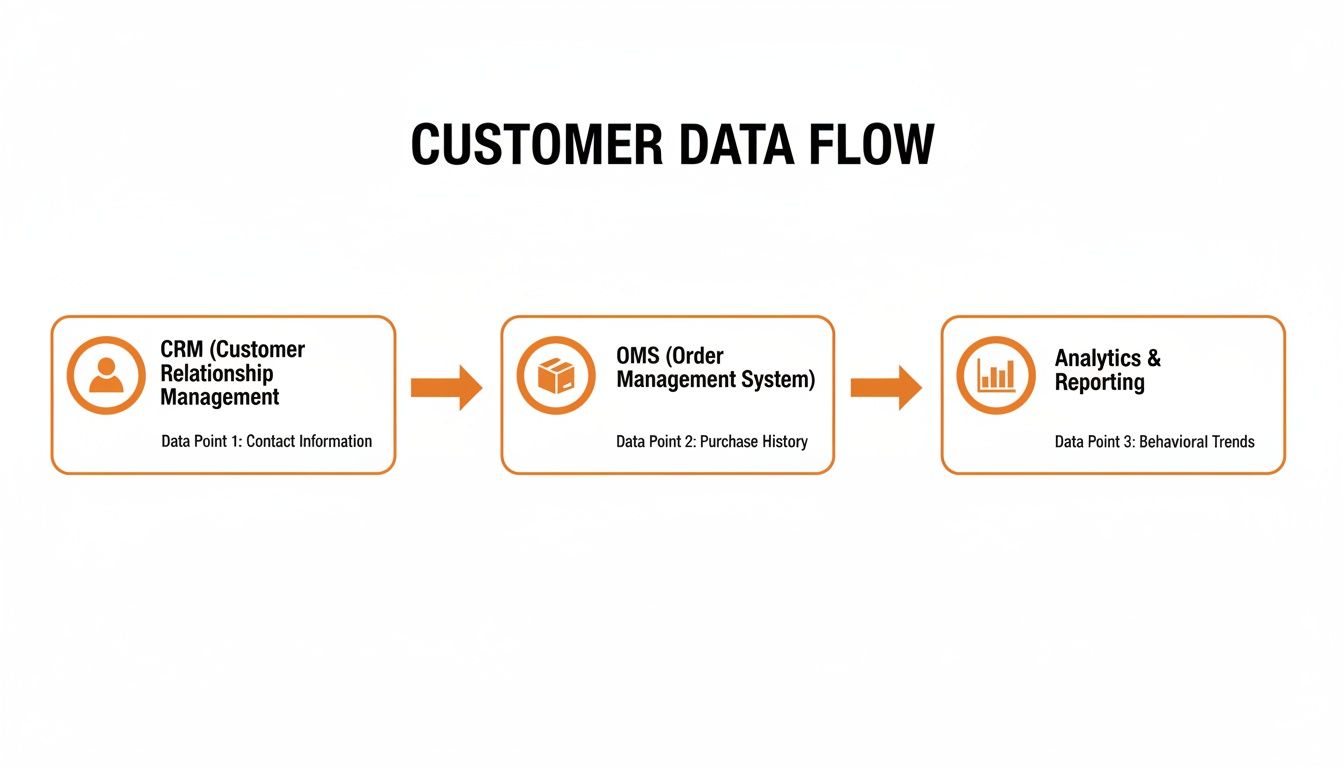
The visual below shows how customer information flows from the relationship-focused CRM to the logistics-driven OMS, creating a unified view that drives better decisions.

A flowchart illustrating the customer data flow from CRM to OMS and then to analytics.

This flow isn’t just about moving data around. It’s about using customer history to power accurate, efficient order processing, turning every transaction into an opportunity to strengthen the relationship.

From Checkout to Doorstep: A Single View

Once an order is placed, the integration kicks into high gear. The order details are instantly zapped from your storefront to the OMS, which then routes it to your 3PL or warehouse. Every single status update—from 'picked' and 'packed' to 'shipped'—is reflected back in both systems at the same time.

This creates a powerful, 360-degree view of the customer. Your support team no longer has to toggle between screens or put frustrated customers on hold.

When a customer calls to ask, "Where is my order?" your team can see their entire purchase history alongside their real-time shipping status, all on one screen. This transforms reactive problem-solving into proactive customer care, completely eliminating the dreaded phrase, "Let me check with the warehouse."

This kind of operational clarity is fast becoming non-negotiable. The global Order Management Systems (OMS) software market is projected to nearly double from $1 billion in 2021 to $1.9 billion by 2026, driven by a 12.3% compound annual growth rate. This explosion is a direct reflection of e-commerce's massive scale, where efficient order handling is make-or-break for businesses like Snappycrate that manage fulfillment for high-volume Amazon FBA and Shopify sellers. You can read more about the future trends of order management systems here.

Unlocking Key Operational Benefits

A tightly integrated CRM and order management platform delivers real, tangible benefits across your entire business—it’s not just about making customer service easier. It builds the foundation you need to scale.

Here’s how it empowers different teams in your operation:

  • For the Marketing Team: Purchase data from the OMS flows back into the CRM, making customer profiles smarter. This lets marketers create hyper-targeted campaigns based on what people actually buy, not just what they looked at.
  • For the Operations Team: Automation kills manual data entry, which drastically cuts down on human error in order processing. The result? Higher order accuracy, fewer returns from incorrect shipments, and lower operational costs.
  • For Leadership: Unified data provides a clear, accurate picture of business performance. Leaders can track key metrics like order fulfillment time, customer lifetime value, and inventory turnover with much greater precision.

Ultimately, this integration ensures that every part of your business is working from the same playbook. It guarantees the promises your marketing team makes are the ones your fulfillment team can keep, creating a consistent and reliable brand experience that builds lasting loyalty.

Choosing Your Integration Strategy

Connecting your CRM and order management systems isn't a simple plug-and-play affair. The right path for your business comes down to your size, your team's technical skills, and where you plan to be in a few years.

Getting this choice right from the start is crucial. It's the difference between building a scalable foundation for growth and creating a tangled mess that you'll have to rip out and replace in two years.

There are really three main ways to get your CRM and order management systems talking. Each has its own pros and cons, and they’re best suited for different stages of a business's journey. Let's break them down.

Direct Point-to-Point Connections

The most straightforward method is a direct, point-to-point integration. Think of it like building a single, dedicated bridge just for your CRM and OMS. This is usually done with APIs (Application Programming Interfaces) that shuttle specific data—like new order details or customer address changes—from one system directly to the other.

This approach can be a quick and cheap win for startups or small businesses with simple workflows. But be warned: it gets fragile fast. As soon as you add another sales channel or a new accounting software, you have to build another separate bridge. Before you know it, you’ve got a complex web of connections that’s a nightmare to manage and troubleshoot.

Want to see how broader connectivity can transform your operations? Check out our guide on unlocking growth with supply chain integration.

Using an Integration Platform (iPaaS)

A much more scalable approach is using an Integration Platform as a Service, or iPaaS. An iPaaS solution is like a central hub or a universal translator for all your software. Instead of connecting every system directly to every other system, you just connect each one to the central hub.

This model gives you incredible flexibility. When you want to add a new app, you just plug it into the hub instead of building a dozen new point-to-point connections. It’s the difference between a clean city grid and a chaotic mess of overlapping back roads.

This is the way to go for growing businesses that know they’ll be adding more tools to their tech stack. It keeps your data flowing cleanly, makes it easier to find and fix problems, and lets your entire system adapt to change without falling apart.

Adopting an All-in-One Platform

The final route is to just skip the integration headache altogether and go with an all-in-one platform that bundles CRM, order management, and other functions from the get-go. These unified systems are built with all the connections already in place.

This path offers the most seamless experience because all your data lives natively in one ecosystem. It’s a powerful choice for businesses that want a single source of truth without the hassle of juggling multiple vendors and integration projects.

This trend is only getting bigger. The cloud-based CRM market is expected to grow at a 13.43% CAGR from 2022 to 2027, largely driven by the demand for integrated solutions that combine sales with core operational functions. You can find more CRM market growth on emailvendorselection.com.

Actionable Tactics for Marketplace and DTC Sellers

A seller's workstation with shipping boxes, a tablet showing product listings, and a notebook with a pen.

All the theory is great, but let's get down to brass tacks. How does combining your CRM and order management actually make you more money? It’s not just about fancy software; it’s about solving the real, everyday headaches that cost you sales, whether you’re selling on Amazon or your own website.

For Amazon FBA sellers, this integration is your command center. It does way more than just track orders. It helps you nail FBA prep compliance, keep an eye on your inbound shipments heading to Amazon, and make sure your inventory numbers actually match what’s on the shelf. This unified view is a lifesaver for preventing stockouts on your fastest-moving products—a mistake that can absolutely crush your sales velocity and tank your product ranking.

For direct-to-consumer (DTC) brands, especially those on a platform like Shopify, the real magic is in hyper-personalized marketing. When your OMS feeds detailed purchase histories back into your CRM, you can slice and dice your customer list with surgical precision. Think targeted campaigns for your loyal repeat buyers or special “we miss you” offers for customers who haven’t shopped in a while. You can find more details in our guide to Shopify order fulfillment services.

Key Metrics to Track for Growth

To see if this is all working, you need to look past the vanity metrics. The right KPIs show you the true health of your operations and how happy your customers really are. This is how you turn all that data from your integrated systems into measurable improvements for your business.

  • Order Accuracy Rate: What percentage of your orders go out the door without a single mistake (wrong item, wrong quantity, wrong address)? An integrated system drives this number up by automating data entry, slashing the human errors that lead to expensive returns and frustrated customers.
  • On-Time Shipping Rate: Are you shipping orders within the timeframe you promised? Your OMS gives you the raw data, but your CRM can help you spot trends, like if a certain customer group is consistently facing delays.
  • Customer Lifetime Value (CLV): This is the ultimate report card for your integration. When you use CRM data to create a smooth, positive order experience, you earn repeat business. That directly boosts the total amount a customer spends with you over their entire relationship with your brand.

Tracking CLV is how you prove the long-term ROI of this investment. It shows that a seamless post-purchase experience—powered by integrated data—isn't just a cost center. It's a powerful engine for building a sustainable, profitable business.

And the market is catching on. The global Order Management Systems market was valued at $2.19 billion in 2021 and is expected to explode to $9.02 billion by 2033, growing at a 12.52% CAGR. This rush is being led by e-commerce sellers who need scalable, compliant fulfillment, especially in North America, which is on track to grab a $1.03 billion share by 2025. You can discover more insights about the OMS market on cognitivemarketresearch.com.

Building Your Blueprint for Seamless Operations

Let's be honest: integrating your CRM and order management system isn't just a nice-to-have anymore. It’s the absolute foundation for any e-commerce brand that wants to scale without breaking. When you connect customer data with your actual warehouse operations, you unlock a new level of efficiency and create a far better experience for your customers.

Think of this connected system as the blueprint for your growth. It frees you up to focus on building your brand and creating amazing products, because you know your operational backbone can handle whatever you throw at it. This is how you turn your fulfillment process from a pure cost center into a powerful engine for customer loyalty and repeat sales.

At the end of the day, a tight integration between your CRM and order management platform makes sure the promises your marketing team makes are the ones your fulfillment team can actually keep. That consistency builds a brand people trust, order after order.

Once your systems are talking to each other, you can finally stop playing defense and putting out fires. You get ahead of the game, managing the entire customer journey—from the first click to the package landing on their doorstep—proactively. This creates a smooth, predictable, and profitable operation built to last. It’s really the core of what it takes to win in e-commerce today.

Common Questions Answered

Even with the best game plan, connecting your CRM and order management systems can raise a few questions. Let's walk through the ones we hear most often so you feel confident making the move to a fully connected operation.

Can I Just Use My CRM to Manage Orders?

While it might be tempting, the short answer is no. Some CRMs let you track sales and see order history, but they aren't built for the heavy lifting of true order management. An Order Management System (OMS) is purpose-built to handle everything that happens after the customer clicks "buy"—from juggling inventory across different sales channels to managing complex fulfillment logic and processing returns.

Trying to use your CRM for this is like managing your company's accounting in a simple spreadsheet. It might work for the first handful of orders, but it breaks down fast as you grow, leading to frustrating bottlenecks and costly mistakes.

What's the Single Biggest Challenge When Integrating?

Nine times out of ten, the biggest headache is data mapping. This is the critical step where you make sure the data fields in both systems are speaking the same language. You have to meticulously connect the dots between customer records, product SKUs, order statuses, and shipping details so they communicate flawlessly.

A rushed or poorly planned data mapping strategy is the #1 reason these integrations fail. You end up with duplicate customer profiles, wrong order information, and a total loss of trust in your data—which defeats the whole point of integrating in the first place.

Before you write a single line of code, take the time to audit your data and draw up a clear mapping plan. Doing this work upfront is what separates a seamless, reliable system from a complete mess.

How Does This Actually Help My Customer Service Team?

It's a game-changer for them. This integration gives your support team a true 360-degree view of every single customer. When someone calls, your agent sees their entire history from the CRM right alongside the real-time status of their current order from the OMS—all on one screen.

No more switching between systems or putting people on hold to "go check with the warehouse." Agents can confidently answer shipping questions, start a return, or give an update with the full story in front of them. This means faster resolutions, happier customers, and a support team that feels empowered to deliver great service every time.


At Snappycrate, we handle the complexities of e-commerce fulfillment so you can focus on growth. From Amazon FBA prep to direct-to-consumer order processing, our 3PL services are built to scale with your brand. Learn how Snappycrate can become a reliable extension of your business.

0 Continue Reading →

Unlocking E-Commerce Growth with Supply Chain Integration

Think of your e-commerce business as an orchestra. You have suppliers, sales channels, warehouses, and shipping partners all playing their parts. Supply chain integration is the conductor, making sure every instrument works in perfect harmony to create a flawless customer experience. Without it, you just get noise—operational chaos.

What Is Supply Chain Integration And Why It Matters

A man uses a tablet in a modern warehouse, featuring a 'Supply Chain Harmony' sign.

At its core, supply chain integration is about breaking down the walls between different parts of your business. It connects systems that used to be separate—like your Shopify store and your 3PL partner’s warehouse—so they can talk to each other and act as one single, smart unit. This creates a network where data flows freely and actions are synced up automatically.

Imagine a customer places an order on your site. In an integrated system, that order instantly pops up in your fulfillment partner’s system. Inventory levels update across all your sales channels in real-time, and a shipping label gets printed without anyone lifting a finger. This isn't just a tech upgrade; it's the engine that lets your brand scale.

The Strategic Value for E-Commerce Sellers

For direct-to-consumer (DTC) brands and Amazon sellers, this kind of integration turns operational headaches into a serious competitive advantage. The benefits are all about speed, accuracy, and real-time visibility.

A fully connected system helps you dodge the common pitfalls that kill growth, including:

  • Stockouts and Overselling: Real-time inventory syncing means you can’t sell products you don’t actually have.
  • Shipping Errors: Automated data transfer eliminates manual entry mistakes, making sure the right product gets to the right person.
  • Delayed Fulfillment: Orders are processed the moment they come in, drastically cutting down the time from click to delivery.

For a growing e-commerce brand, manual processes are the enemy of scale. Supply chain integration automates the routine tasks, freeing up your team to focus on marketing, product development, and customer service instead of putting out logistical fires.

Outsourcing as a Path to Integration

Let's be real—building this level of connectivity from scratch is a massive undertaking. That's why so many brands turn to strategic outsourcing. A huge 52% of total supply chain costs are already spent on outsourcing partnerships, with companies offloading things like storage, fulfillment, and FBA prep to specialized 3PLs.

Partnering with a 3PL like Snappycrate isn't just about handing off tasks. You’re plugging your operations directly into an established ecosystem built for efficiency. You can learn more about how expert supply chain and warehouse management is the foundation for this kind of growth. This lets you focus on your core business while your fulfillment partner handles the complex logistics, ensuring your operations can keep up with your ambitions.

The Three Essential Flows of an Integrated Supply Chain

A workspace with a laptop displaying a data interface, a 'SynC Three Flows' box, documents, and a plant.

Real supply chain integration isn’t just about plugging in some software. It’s about getting three critical flows to move in perfect sync. Think of them as the lifeblood of your entire e-commerce operation: information, products, and money.

When these flows are out of whack, you get costly errors, angry customers, and a whole lot of headaches. But when they move in harmony, your business runs like a well-oiled machine. This is exactly what a modern 3PL partnership is designed to do—turn potential chaos into a smooth, predictable process.

The Information Flow

This is the digital nervous system of your business. The information flow is all the data zipping back and forth between you, your customers, your suppliers, and us, your fulfillment partner. It’s the real-time conversation that makes everything else work.

This isn’t just abstract data; it's mission-critical intelligence:

  • Customer Orders: That order from your Shopify store needs to hit our warehouse management system instantly.
  • Inventory Levels: Stock counts must sync back to your sales channels in real-time to stop you from selling products you don't have.
  • Shipping Confirmations: Tracking numbers have to flow from the carrier to your store and straight to your customer’s inbox.
  • Inbound Notifications: Your suppliers send us an advanced shipping notice (ASN) so we know exactly what’s arriving and when.

Without a clean, automated information flow, you're essentially flying blind. Manual data entry is a recipe for disaster—human error, delayed orders, and wrong inventory counts that chip away at customer trust and your profits.

The Product Flow

While information moves at the speed of light, your products have to move physically. The product flow is the literal journey your inventory takes, from your supplier’s loading dock to your customer’s doorstep. A truly integrated supply chain makes this physical movement fast, accurate, and totally transparent.

Every single step is a link in the chain that can’t afford to break:

  1. Receiving: We take in your inventory, verifying counts and checking for any damage right away.
  2. Storage: Your products are put away in designated, organized spots in the warehouse so we can find them in a flash.
  3. Picking and Packing: An order comes in, and our team picks the right items and packs them securely for transit.
  4. Shipping: The package is handed off to the right carrier to get it to its final destination.
  5. Returns Management: If a customer sends something back, the product flows in reverse—back to our warehouse for inspection and restocking.

An integrated product flow means your 3PL knows exactly what to do with your inventory at every stage. This orchestrated movement minimizes handling time, reduces the risk of loss or damage, and gets orders out the door faster.

The Financial Flow

Last but not least, money has to move, too. The financial flow tracks every dollar, from customer payments to supplier invoices and fulfillment fees. Getting this piece right is non-negotiable for staying profitable and maintaining healthy cash flow.

We’re talking about purchase orders, invoices, credit terms, and payments. When this flow is integrated with your accounting software, you get a crystal-clear view of your costs and revenue.

For instance, the moment we ship an order, the fulfillment and shipping costs are logged automatically. This gives you a precise, up-to-the-minute understanding of your cost of goods sold (COGS) and profit margins on every single sale. A disconnected financial flow, on the other hand, creates accounting nightmares and makes it impossible to know if you're actually making money.

The Technology Powering Your Integrated Operations

To make seamless e-commerce fulfillment a reality, you need more than just good intentions. You need a powerful tech stack where different systems communicate flawlessly.

Think of it like a specialized team. Each member has a distinct role, but they all share information instantly to achieve one goal: getting orders to your customers fast and accurately.

This digital conversation is the backbone of supply chain integration. It’s how an order on your Shopify store can trigger a physical action in a warehouse hundreds of miles away in just a few seconds. Let's break down the key players in this tech ecosystem and see how they work together.

The Core Systems Your Business Runs On

At the heart of any integrated operation are a few core software platforms. Each one acts as the single source of truth for a specific part of your business, and their ability to connect is what makes automation possible.

  • Enterprise Resource Planning (ERP): This is the central brain of your entire business. Your ERP system holds the master data for everything from product information (SKUs, costs, descriptions) and financials to customer records and supplier details. It’s the ultimate source of truth.

  • Warehouse Management System (WMS): If the ERP is the brain, the WMS is the command center of the warehouse. It directs every physical movement inside the four walls of a fulfillment center—from receiving and putaway to picking, packing, and shipping. A good WMS optimizes efficiency, telling workers the best path to pick items and ensuring inventory is stored correctly. For an in-depth look at how this impacts your stock levels, check out our guide to real-time inventory management.

  • Order Management System (OMS): The OMS acts as the traffic controller for all your customer orders. It pulls in orders from every sales channel you have (Shopify, Amazon, Walmart) and routes them to the right fulfillment location based on rules you set, like inventory availability or customer location.

These systems can’t operate in silos. They need a way to talk to each other, which brings us to the messengers that carry data back and forth.

How Systems Communicate: API vs. EDI

For these platforms to work as a single unit, they need a common language and a way to transmit messages. This is typically handled by two main technologies: APIs and EDI. While they achieve similar goals, their methods are quite different.

An API (Application Programming Interface) is a modern, flexible messenger. Think of it like a waiter in a restaurant. You (your OMS) tell the waiter what you want (a new order), and the waiter communicates that request to the kitchen (the WMS). The waiter then brings back the completed dish (a tracking number). APIs are built for fast, real-time, two-way conversations.

On the other hand, an EDI (Electronic Data Interchange) is a more traditional, structured language. It’s like sending a standardized, formatted business document—like a purchase order or an invoice—between two systems. It’s highly reliable and secure but is often more rigid and less suited for the instant feedback that e-commerce demands.

This table breaks down the core differences.

Comparing Integration Technologies: API vs. EDI

Feature API (Application Programming Interface) EDI (Electronic Data Interchange)
Speed Real-time or near real-time communication Typically batch-processed; slower
Flexibility Highly flexible; can handle custom data formats Rigid and standardized formats
Cost Generally lower implementation cost Can be expensive to set up and maintain
Data Format Uses modern, web-friendly formats like JSON Uses legacy, structured text formats (e.g., ANSI X12)
Best For E-commerce, mobile apps, real-time updates B2B transactions, large enterprise systems, retail
Analogy A direct, two-way phone conversation Sending a formal, structured letter via mail

While both have their place, the real-time nature of APIs makes them the clear winner for modern e-commerce operations.

The key takeaway: While EDI is still used in many legacy supply chains, APIs have become the gold standard for e-commerce integration. Their flexibility allows for the kind of real-time data exchange that prevents overselling and keeps customers updated instantly.

Putting It All Together: A Real-World Example

Let’s see how this creates a powerful, automated feedback loop. Imagine a customer buys a blue t-shirt from your Shopify store.

  1. Order Placed: The order is captured by your OMS, which immediately confirms payment and checks inventory rules.
  2. API Call: The OMS makes an API call, instantly sending the order details (SKU, quantity, shipping address) to your 3PL partner's WMS.
  3. Warehouse Action: The WMS receives the order, creates a picklist, and directs a warehouse associate to retrieve the blue t-shirt.
  4. Inventory Update: As the item is picked, the WMS updates its own inventory count and sends another API message back to your ERP and OMS, decrementing the stock level for that SKU.
  5. Sync Across Channels: Your OMS then pushes this updated inventory count to all your sales channels, ensuring your Shopify and Amazon listings reflect the new, accurate stock level.

This entire cycle happens automatically, without anyone lifting a finger. It prevents overselling and ensures that every system—from finance to fulfillment—is working with the exact same data. This is the true power of supply chain integration in action.

A Practical Roadmap for 3PL Integration

Kicking off a supply chain integration with a new 3PL partner can feel like a massive undertaking. But with a clear roadmap, what seems like a complex project breaks down into a series of simple, manageable steps. A solid plan takes the guesswork out of the equation, keeps disruptions to a minimum, and sets your partnership up for success right from the start.

Think of this as a strategic journey, not just a technical task. Each phase builds on the one before it, making sure your business and your fulfillment partner are perfectly in sync before a single order goes out the door.

Let's walk through the entire process, from initial planning to the final go-live, to ensure everything runs smoothly.

Phase 1: Initial Discovery and Planning

The bedrock of any successful integration is a deep, honest look at your current operations. Before you write a single line of code, you need to audit your existing processes from top to bottom. Where are the bottlenecks holding you back? What manual tasks are eating up your team's time?

This is all about asking the right questions:

  • Process Mapping: Get it all down on paper. Document your entire fulfillment workflow, from the moment a customer clicks "buy" to the second a package lands on their doorstep.
  • Pain Point Identification: Be specific. Are you dealing with constant inventory discrepancies? Are shipping times lagging? Are manual data entry errors causing chaos?
  • Goal Setting: Define what a "win" looks like for you. Are you aiming for a 99.9% order accuracy rate? Do you need a 24-hour dock-to-stock time? Are you planning for a 50% increase in order volume next quarter?

Once you have that clear picture, you can start looking for the right 3PL partner. Don't just hunt for warehouse space—find a partner with proven tech chops and experience integrating with platforms you already use, like Shopify or Amazon. Understanding what a 3PL warehouse really brings to the table technologically is a crucial first move.

Phase 2: Scoping and Technical Definition

With a partner chosen, it’s time to get technical and define the scope of the project. You're essentially creating a detailed blueprint for how data will flow between your systems and the 3PL’s Warehouse Management System (WMS).

This isn't just about plugging one system into another. It's about defining the exact data points that need to be shared to put your operations on autopilot.

Key data flows to map out include:

  1. Order Information: What fields are non-negotiable for every order? Think SKU, quantity, customer address, and requested shipping method.
  2. Inventory Updates: How often will inventory levels sync back to your sales channels? Real-time is the gold standard here.
  3. Shipment Confirmations: What info (tracking number, carrier) needs to come back to your system to trigger those all-important customer shipping notifications?
  4. Returns Data: How will return merchandise authorizations (RMAs) be created, communicated, and processed?

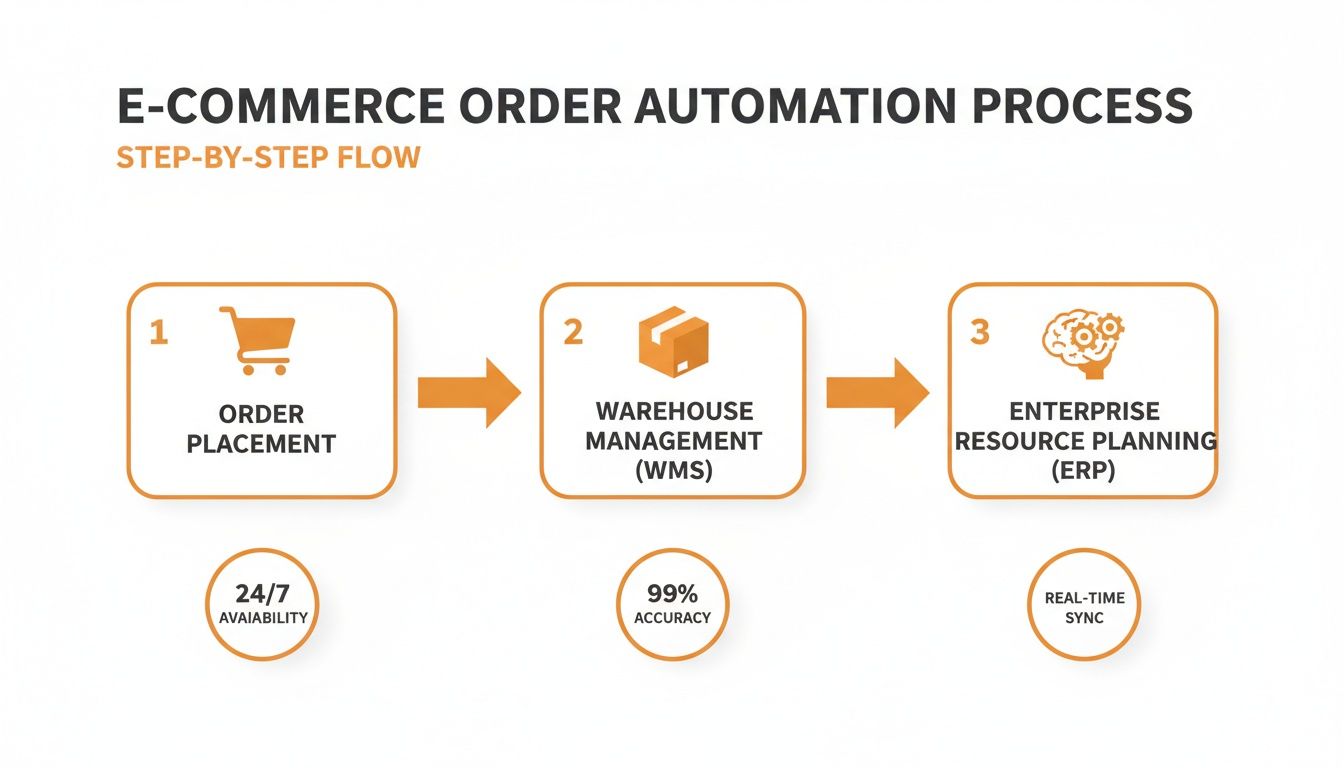
This diagram shows exactly how an order can flow seamlessly from your e-commerce store, through the WMS, and sync back up with your business systems.

An e-commerce order automation process flow diagram illustrating order placement, WMS, and ERP integration.

This automated workflow is the whole point of integration—it gets rid of manual touchpoints and makes fulfillment faster at every step.

A well-defined scope is your best defense against "scope creep"—the unexpected additions that can delay projects and inflate costs. Be meticulous here to ensure everyone is on the same page about what needs to be built.

Phase 3: Development and Rigorous Testing

Once the blueprint is locked in, the technical teams can start building the connections, usually with APIs. This is where the digital plumbing gets laid, linking your ERP, OMS, and e-commerce platforms to the 3PL's WMS.

But building the connection is only half the battle. The testing phase is arguably the most critical part of the entire integration. This is where you put the system under pressure to find and squash bugs before they ever affect a real customer.

Your testing needs to cover a wide range of real-world scenarios:

  • Standard Orders: Does a simple, one-item order fly through the system correctly?
  • Complex Orders: What about orders with multiple items, bundles, or special packing instructions?
  • Edge Cases: Test what happens with order cancellations, mid-stream address changes, and out-of-stock items.

Thorough testing ensures that when you finally flip the switch, the system works just like it's supposed to. Rushing this step is a classic mistake that leads to post-launch headaches, lost sales, and unhappy customers.

Phase 4: Go-Live and Ongoing Optimization

After every test is passed and both teams give the green light, it’s time for the go-live. This is usually done in a phased rollout. You might start by routing a small percentage of your orders through the new system, watching them like a hawk before ramping up to 100%.

But the work doesn’t stop at launch. A great partnership is all about continuous monitoring and improvement. Regularly review key performance indicators (KPIs) with your 3PL to find new ways to get better. The end goal is a tough, scalable fulfillment operation that grows right alongside your business.

How to Measure Your Integration Success

Connecting your systems is a huge step, but a successful supply chain integration isn't just about whether the tech works. The real question is: is it actually making your business better?

To answer that, you need to ditch the gut feelings and dig into the hard data. Key performance indicators (KPIs) are your scorecard, showing you the real-world health of your operations.

Tracking the right metrics gives you an objective view of what’s working and what isn't. It allows you to have productive, data-driven conversations with your fulfillment partner, pinpoint weak spots, and prove the ROI your integrated supply chain is delivering to your bottom line and your customers.

Key Metrics for E-Commerce Fulfillment

While you could track dozens of different metrics, a few core KPIs tell most of the story. Nailing these three will give you a powerful, at-a-glance snapshot of your fulfillment efficiency.

1. Order Accuracy Rate

This is the ultimate measure of getting it right. It calculates the percentage of total orders shipped without a single error—no wrong items, incorrect quantities, or damages. A high rate here is a direct reflection of a well-oiled picking and packing process.

  • Formula: (Total Orders Shipped Perfectly / Total Orders Shipped) x 100
  • Why It Matters: Inaccurate orders torch your profits. They lead to expensive returns, negative reviews, and wasted labor fixing mistakes. Get this right, and everything else gets easier.
  • Industry Benchmark: Top-tier operations consistently hit an order accuracy rate of 99.8% or higher.

2. On-Time Shipping Rate

In e-commerce, speed is king. This metric tracks the percentage of orders that leave the warehouse on or before the promised date. It’s a make-or-break indicator of your fulfillment partner’s ability to meet customer expectations.

  • Formula: (Orders Shipped On or Before Deadline / Total Orders Shipped) x 100
  • Why It Matters: A low rate often signals bottlenecks in the warehouse, like messy pick paths or staffing issues. Consistently missing shipping deadlines is one of the fastest ways to kill your brand’s reputation.
  • Industry Benchmark: The gold standard is an on-time shipping rate of 99% or better.

3. Inventory Accuracy Rate

This KPI measures the gap between the inventory numbers in your software and the actual physical stock on the warehouse shelves. A good integration keeps these numbers in sync, but you still need regular cycle counts to keep them honest.

  • Formula: 1 - (Absolute Difference Between Recorded and Actual Inventory / Recorded Inventory) x 100
  • Why It Matters: This is the foundation for preventing stockouts and overselling. When your numbers are off, you can’t trust your system, leading to lost sales and frustrated customers.
  • Industry Benchmark: A healthy, well-run warehouse should maintain an inventory accuracy rate of 99.5% or higher.

To make it even easier, here's a quick reference table with the most essential fulfillment KPIs.

Essential E-Commerce Fulfillment KPIs

KPI What It Measures Industry Benchmark
Order Accuracy Rate The percentage of orders shipped without any errors (wrong item, quantity, or damage). 99.8%+
On-Time Shipping Rate The percentage of orders shipped on or before the promised fulfillment date. 99%+
Inventory Accuracy Rate How closely your system's inventory count matches the physical inventory in the warehouse. 99.5%+
Dock-to-Stock Time The time it takes for incoming inventory to be received, processed, and put away. Under 24 hours
Order Cycle Time The total time from when a customer places an order to when it's delivered. Varies by service
Cost Per Order The total warehouse cost (labor, packing, etc.) divided by the number of orders shipped. Varies by 3PL/product

Monitoring these metrics regularly isn't just about checking boxes; it's about creating a constant feedback loop.

This data gives you the insights needed to collaborate with your 3PL, fine-tune processes, and ensure your integration continues to drive growth and efficiency.

When you consistently measure performance, you turn your supply chain from a cost center into a strategic asset—ensuring every dollar you invest in integration pays off in customer loyalty and a stronger bottom line.

Common Integration Mistakes and How to Avoid Them

A successful supply chain integration is as much about dodging pitfalls as it is about following a perfect plan. Even with the best tech on your side, simple oversights can lead to costly delays, frustrated teams, and a project that completely misses the mark.

Knowing where these common traps lie is the first step to avoiding them. By learning from the challenges others have faced, you can sidestep these errors and make sure your integration project gets off to a strong start.

Overlooking Data Hygiene and SKU Management

One of the most frequent—and damaging—mistakes we see is assuming your product data is clean and consistent. This leads to a nightmare scenario we call "The SKU Mismatch," a seemingly small problem with massive consequences.

Imagine your Shopify store lists a product as "BLUE-TSHIRT-L" but your 3PL’s system knows it as "TSBL-L." When an order for the first SKU hits the warehouse, the system has no idea what it is. The order stalls, fulfillment stops, and a simple data inconsistency grinds your entire operation to a halt until someone can fix it manually.

A successful integration runs on clean, standardized data. Before you connect a single thing, do a thorough audit of your product catalog. Make sure every SKU, barcode, and product description is identical across all your systems—your ERP, your e-commerce platform, and your 3PL’s WMS.

Underestimating the Need for Process Change

Another huge pitfall is treating integration as a purely technical project. A lot of businesses believe they can just plug in new software without changing how their teams actually work. This is a recipe for failure.

Technology is just a tool; it can’t fix broken or clunky workflows. If your team is used to manually adjusting inventory numbers or emailing spreadsheets back and forth, just giving them a new dashboard won't solve the underlying problem. The new tech requires new processes to work.

To avoid this, you have to:

  • Map Existing Workflows: Get a clear picture of how things are done today, warts and all.
  • Design Future-State Processes: Work with your 3PL to design new workflows that actually take advantage of the automation.
  • Invest in Training: You can’t just hand over the keys. Train your team thoroughly on the new processes so everyone knows their role in the integrated system.

Choosing Incompatible Technology Partners

Not all tech is created equal. A critical mistake is partnering with a 3PL whose systems can't easily connect with your existing tech stack. Choosing a partner with a rigid, outdated WMS or one that lacks flexible APIs will turn your integration project into a money pit of custom-coded workarounds.

Before you sign any contracts, ask pointed questions about their technical capabilities. Do they have pre-built integrations for platforms like Shopify or Amazon? Can they give your developers clear API documentation? A partner with a modern, adaptable tech stack will make the entire process smoother and faster. Skipping this step almost always leads to headaches and budget overruns.

Your Top Integration Questions, Answered

Diving into a full supply chain integration can feel like a big step, and it naturally brings up a lot of practical questions. E-commerce brands want to know what they're getting into before they commit. Getting clear, straightforward answers helps take the mystery out of the process and shows the real-world value of having a fully connected operation.

Let's tackle some of the most common questions we hear from growing businesses just like yours.

How Long Does a 3PL Integration Take?

This is always the first question, and the honest answer is: it depends on how complex your setup is. A standard, out-of-the-box integration with a major platform like Shopify can often be up and running in just a few weeks.

However, if you're working with custom-built systems or connecting multiple sales channels, the timeline might stretch to one to three months. The final schedule really depends on a few key things: how clean your product data is, how quickly technical teams on both sides can work together, and how thoroughly we test everything before going live.

Is Integration Only for Big Companies?

Not at all. In fact, you could argue that supply chain integration is even more critical for businesses on the rise. Small to mid-sized brands are the ones who feel operational growing pains the most, especially when a sudden surge in orders threatens to swamp their manual processes.

Integration gives a growing brand the scalable foundation to say "yes" to new opportunities. Think expanding to a new marketplace or running a huge sale—all without worrying that your fulfillment will break under the pressure.

Can I Connect Multiple Sales Channels to One 3PL?

Yes, and this is where the magic really happens. A modern 3PL acts as your central command center for fulfillment, plugging into all the places you sell, such as:

This creates a single source of truth for all your inventory. When an item sells on Amazon, the stock level is automatically updated on your Shopify store. This simple sync completely eliminates the risk of overselling and makes managing your inventory across the entire business a whole lot simpler.


Ready to build a scalable fulfillment operation that actually grows with you? Snappycrate provides the expert integration and reliable service you need. Get in touch with our team today.

0 Continue Reading →